
Scan barcodes
Use barcode scanning as part of a structured item count workflow.
Give stock counters a mobile workflow for barcode-based counting, even when connectivity is unreliable. Consolidate count data for review with the Windows application.
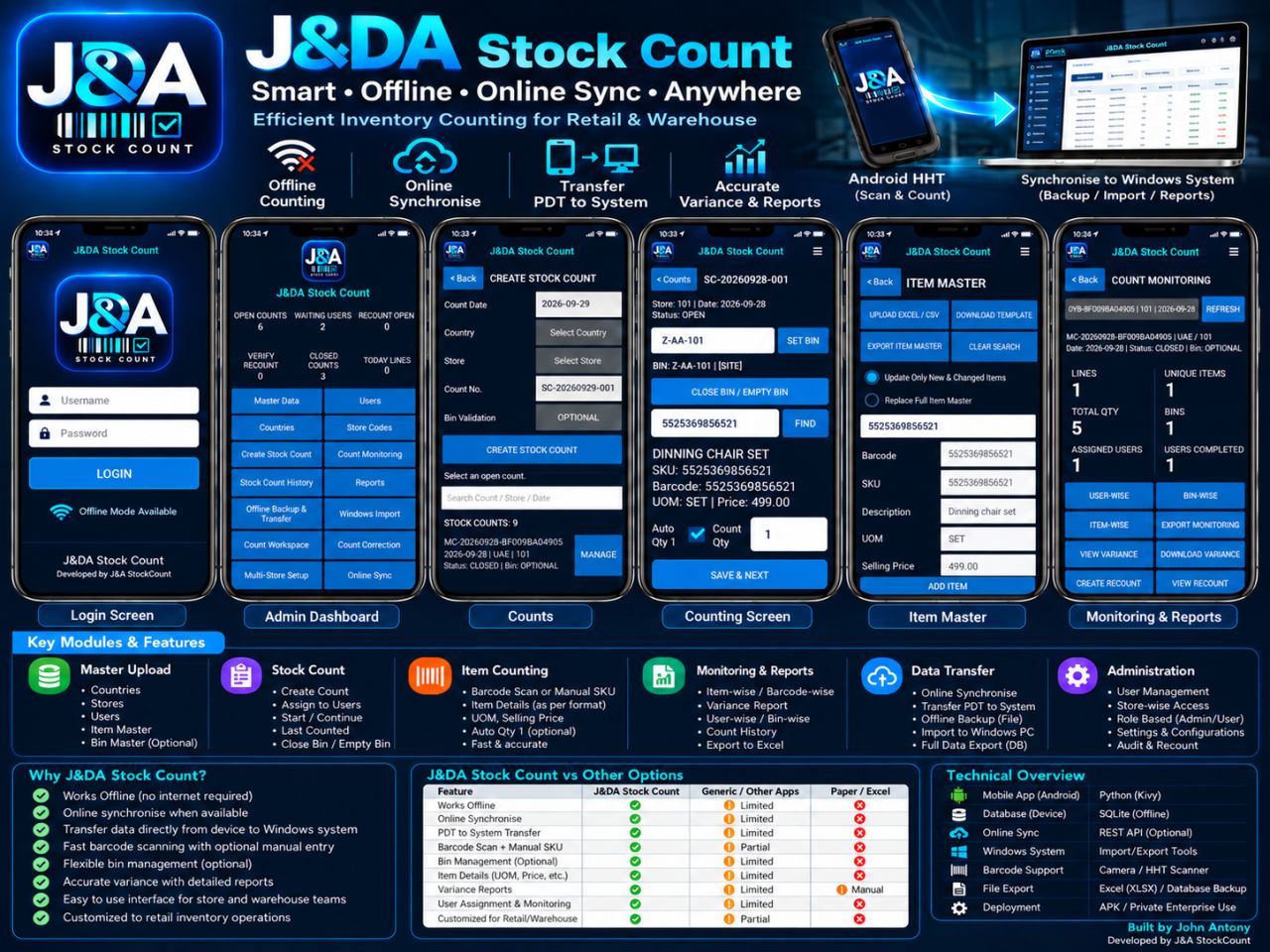
Use the Android device at the shelf, keep the count moving offline, then bring count files together for review.
Use barcode scanning as part of a structured item count workflow.
Continue counting offline, then synchronise when a connection is available.
Use optional bin management, count history and recount workflows to organize stocktakes.
Transfer device data to Windows for backup, import and count reporting.
Record quantities close to the products being counted with a mobile-first flow.
Review count activity and variance reports by item, bin or user, and create a recount when needed.
Share your device setup, number of stores and how your team consolidates counts. We’ll discuss whether StockCount fits the process.
StockCount is intended to support offline Android counting so the team can continue the count when connectivity is unavailable. Tell us about your device and data workflow.
Yes. Count with barcode scanning or manual SKU entry, depending on the item and workflow.
Transfer count data to the Windows system for backup, import, reports and review. Talk with us about how that fits your stock review process.
Tell us about your stores, devices and stocktake process.